Truple - Online Accountability
- 4.4
- Rating
- 50.00K
- Installs
- Free
- Price

 Analysis by App-foxy
When a family wants a clearer picture of how a child uses a phone, the difficult part is rarely installing another app. The difficult part is turning concern into a routine that feels fair, understandable, and useful. I approached Truple as a parenting app for that exact situation: not as a magic lock for every digital problem, but as a tool for online accountability from Truple that can help parents and children discuss screen habits with something more concrete than guesswork.
My first impression is that the app makes more sense for families who want visibility and conversation than for parents looking only for strict time limits. That distinction matters. Many usual parental-control alternatives focus on blocking applications, scheduling downtime, or filtering websites. Truple’s appeal is different: it is built around helping a family stay aware of online activity and use that awareness as part of a longer-term agreement.
The useful question is not simply “Can this app monitor a phone?” but “What will our family do with the information afterward?” If the answer is a calm check-in, a revised rule, or a conversation about trust, the app has a clearer purpose. If the plan is to collect information without explaining expectations, the same workflow can quickly create tension.
You May Also Like

 Blood Strike: 2.5 Anniversary
Blood Strike’s Loadouts Turn Every Drop Into a Tactical Gamble
A close look at Blood Strike’s custom loadouts: how fast access to signature weapons reshapes its battle royale rhythm, rewards preparation, and narrows the gap between fights.

 Pandora - Music & Podcasts
Pandora’s Music Is Easy to Start, but Harder to Recover
Pandora’s strength is its low-effort path from a seed to a station. Its weak spot is how much confidence it asks you to place in connection, setup, and quiet recovery.

 8 Ball Pool
 Is Built on Rivalries, Rematches, and Routine
A close look at the rivalries, rematches, shared routines, and unanswered safety questions that turn a quick pool match into a persistent mobile community.

 Samsung Music
’s Quiet Strength Is Playing What You Already Own
Its reach comes less from spectacle than from dependable access to a personal library. That simplicity is both the app’s strongest retention engine and its ceiling.

 AccuWeather: Weather Radar
AccuWeather Review: A Quick, Clear Forecast for Everyday Decisions
For everyday plans, the best forecast is the one you can understand quickly. AccuWeather makes rain timing, radar, and local conditions easy to act on, with a few trade-offs.

 Hill Climb Racing
Why Hill Climb Racing Still Turns Crashes Into One More Run
A tiny car, a bumpy hill and one more upgrade: Hill Climb Racing keeps resurfacing because its simple chaos makes every near-miss feel personal.
More From Our News Desk



From a vague worry to a workable family routine
Before I settle on whether this approach can become part of family life, I want to look at what it asks of a phone and of the adults using it. A useful routine depends not only on what the app is meant to do, but also on whether it fits the pace of an ordinary day. That leads naturally to the practical question of how to keep the process manageable when online activity gets busy.
Starting with the problem you actually want to solve
I would begin by identifying the specific problem before opening the app. Perhaps a child is using a device late at night, a teenager has started receiving uncomfortable messages, or a parent wants more accountability around browsing without taking the phone away completely. Those situations sound similar, but they call for different conversations and different expectations.
Truple is listed in the Parenting category, and that positioning fits its strongest use. It is not merely a personal productivity tracker. The point is the relationship between the person using the device and the adult responsible for helping them use it safely. That means the setup should be discussed openly, especially with older children who are capable of understanding why monitoring is being introduced.
I would tell the child what the family is trying to improve, what kind of review will happen, and what will not happen. I would also agree on when the information will be discussed. A weekly conversation can feel very different from an adult checking constantly and reacting to every small detail. The app cannot create that agreement for you, but it can give the agreement a practical place to begin.
Installing and preparing the household
The app is free to install, which lowers the barrier for a family that wants to test the approach before committing money. Its age rating is Everyone, making the presentation broadly approachable, although the real suitability still depends on the child’s age, maturity, and the family’s privacy expectations. Optional purchases range from a small amount to a much larger amount per item, so I would review the available choices carefully rather than assuming every useful capability belongs to the free experience.
Truple was released on April 12, 2017, and the current version is 2.9.8. It supports devices running Android 7.0 or later. That compatibility is helpful for families using older Android phones, but I would still check every device involved before planning a household rollout. A monitoring routine is only as reliable as its least compatible or least consistently configured device.
The developer is Truple, and the app has passed the point where it feels like an unknown experiment: it has more than fifty thousand installs, with a 4.4 average from roughly nine hundred ratings. I see those figures as a sign of established interest rather than proof that it will suit every family. Parenting tools are especially personal; a feature that feels reassuring in one home can feel intrusive in another.
The first handoff: parent to child
The most important handoff happens before any information is reviewed. The parent needs to explain the arrangement, and the child needs a chance to ask what it means in everyday life. I would avoid presenting Truple as a trap. A better explanation is that the family is trying to make online behavior discussable and to provide support when something goes wrong.
This is also where I would define the boundary between safety and curiosity. If the parent promises to use the app only for agreed purposes, that promise should guide later decisions. For example, a concerning pattern may justify a conversation, while an ordinary personal message may not need to become a family debate. The value of accountability disappears when the monitored person believes every detail will be used against them.
For younger children, the explanation may be short and concrete. For teenagers, I would be much more explicit about trust, review frequency, and how rules can change. A teenager who understands the process is more likely to treat it as part of a safety plan. A teenager who discovers it accidentally may focus entirely on the feeling of surveillance, even if the original intention was protective.
Following the workflow instead of chasing alerts
Once the household has agreed on the purpose, I would let the routine run long enough to reveal a pattern rather than reacting to a single moment. This is one of the less obvious advantages of an accountability approach: it can shift the discussion from “You were on your phone again” to “Here is the pattern we agreed to look at.” That change makes the conversation less dependent on memory and less likely to become an argument over who noticed what.
A practical review might happen at a planned time when neither person is rushed. The parent can ask what the child remembers doing, whether anything felt uncomfortable, and whether the current rules are realistic. The child can explain context that a record alone cannot show. A late-night session might reflect a homework deadline, a friend in distress, or simple avoidance of sleep. The information starts the conversation; it should not end it.
I would also keep the number of rules small. If a family creates a complicated policy for every possible online behavior, the app becomes part of an exhausting administrative task. A few clear goals—such as safer communication, more honest reporting, or a consistent bedtime routine—are easier to review and adjust.
An everyday example from input to outcome
Imagine a parent notices that a twelve-year-old has been unusually tired before school. The starting condition is uncertainty: the child says the phone was used briefly, but the parent suspects a longer pattern. Instead of confiscating the device immediately, the family agrees to use Truple as part of a short accountability period and to discuss the results at the weekend.
The handoff is simple but important. The parent explains the reason, the child knows that the activity will be reviewed, and both agree that the goal is restoring sleep rather than assigning blame. Over several days, the parent has something more useful than a guess. At the weekend meeting, they discuss whether the late use came from games, messages, schoolwork, or another reason, then decide whether the bedtime rule needs a practical change.
The outcome is not necessarily a punishment. It might be charging the phone outside the bedroom, changing the agreed review time, or giving the child a clearer way to ask for an exception. In that scenario, Truple is valuable because it supports a repeatable process: concern, shared expectation, review, context, and adjustment.
Where the handoffs become difficult
The app cannot interpret every situation correctly for you. A record of online activity may show that something happened without explaining why it happened. This is the central trade-off compared with a simple time-limit tool. A timer can answer whether a limit was reached; an accountability workflow may encourage a deeper discussion, but that discussion requires patience and judgment.
Another friction point is consistency between adults. If one parent checks the information regularly while another ignores the agreement, the child receives mixed signals. I would decide in advance who is responsible for routine reviews and how the other caregiver will be included. The process should not turn into one parent acting as an investigator while everyone else remains outside the conversation.
There is also a risk of over-monitoring. A parent who is anxious may be tempted to inspect everything, even when the original goal was limited. That can make the app feel like a permanent audit rather than a temporary support tool. I would set a review schedule, write down the purpose in plain language, and revisit whether the level of oversight is still justified.
How it compares with familiar alternatives
Traditional parental-control apps are often strongest when the main need is direct control: blocking an application, limiting a schedule, or preventing access to selected material. Those tools can be a better fit for a young child who needs firm boundaries or for a household dealing with a very specific access problem.
Truple is more appealing when the family wants accountability to remain part of the relationship. It fits parents who want to notice behavior, discuss it, and gradually build better habits rather than relying only on automatic restrictions. That does not make it a replacement for every safety tool. A family may still prefer a dedicated filtering or device-management solution when technical blocking is the priority.
The trade-off is that Truple asks more of the adults using it. A blocking tool can enforce a rule in the background. An accountability tool is most effective when someone reviews information responsibly and follows through with a calm conversation. If you want a set-it-and-forget-it solution, this may feel like extra work. If you want a structured reason to keep talking about online choices, that extra work is part of the benefit.
Practical habits that make the review process better
I would start with a limited trial goal rather than introducing the app as an indefinite punishment. Choose one concern, explain how success will be judged, and decide when the family will reassess. This prevents the monitoring process from expanding into every part of a child’s digital life.
Second, separate safety issues from ordinary disagreements. A message that suggests immediate danger deserves a different response from a child spending longer than expected on entertainment. Treating every deviation as an emergency teaches the child to hide information instead of asking for help.
Third, let the child contribute to the solution. If the problem is late-night use, ask what would make the rule easier to follow. If the problem is uncomfortable contact, ask what support would make reporting feel safe. This turns the app from a one-way inspection into a shared workflow, which is where its parenting value is strongest.
Fourth, keep a clear handoff between evidence and action. The information should lead to a question, not an automatic accusation. I find that wording matters: “Help me understand what happened here” opens a different conversation from “Why did you break the rule?”
Who will appreciate it, and who should skip it
I think Truple is best for parents who are willing to be involved, who want online behavior to become easier to discuss, and who see accountability as a gradual teaching process. It can be particularly useful when a family has already tried verbal reminders but needs a more concrete basis for reviewing habits.
I would be cautious about recommending it to a household where the child has not been told what is happening, where caregivers disagree about monitoring, or where the parent primarily wants silent surveillance. The app cannot repair a trust problem by itself. In some families, a simple device schedule or a direct conversation may be healthier and more effective.
It may also be the wrong first choice if your only requirement is aggressive blocking or highly automated device administration. In that case, a traditional parental-control product designed around restrictions may offer a cleaner match. Truple’s distinctive strength is the accountability conversation, not the promise that technology can make every parenting decision automatically.
The result I would expect after using it thoughtfully
Used well, the result is not merely a parent seeing more. The better outcome is a family becoming more specific about digital behavior: what is safe, what needs attention, what deserves privacy, and what can change with maturity. That is a more demanding result than installing an app and turning on a switch, but it is also more meaningful.
I like that the product’s purpose can fit a staged approach. A family might begin with close review during a difficult period, then reduce the intensity as habits improve. The important part is making that transition explicit. Without a plan to reassess, temporary support can quietly become a permanent arrangement.
My overall view is positive, with a clear qualification. Truple works best as a conversation tool backed by visibility, not as a substitute for parenting. The free entry point makes it easy to explore, and its established presence, current Android support, and 4.4 average from its user ratings make it a reasonable app to consider. Optional purchases mean I would examine the cost of any desired upgrade before building the family routine around it.
For a parent who wants to move from vague worry to a repeatable process, Truple - Online Accountability offers a thoughtful direction. Start with a defined concern, explain the arrangement, agree on a review rhythm, and treat the information as a prompt for context. If your household can handle those handoffs with honesty and restraint, the app may help turn online safety from a recurring argument into a more manageable family practice.
FAQs for Truple - Online Accountability
01What is Truple - Online Accountability and how does it work?
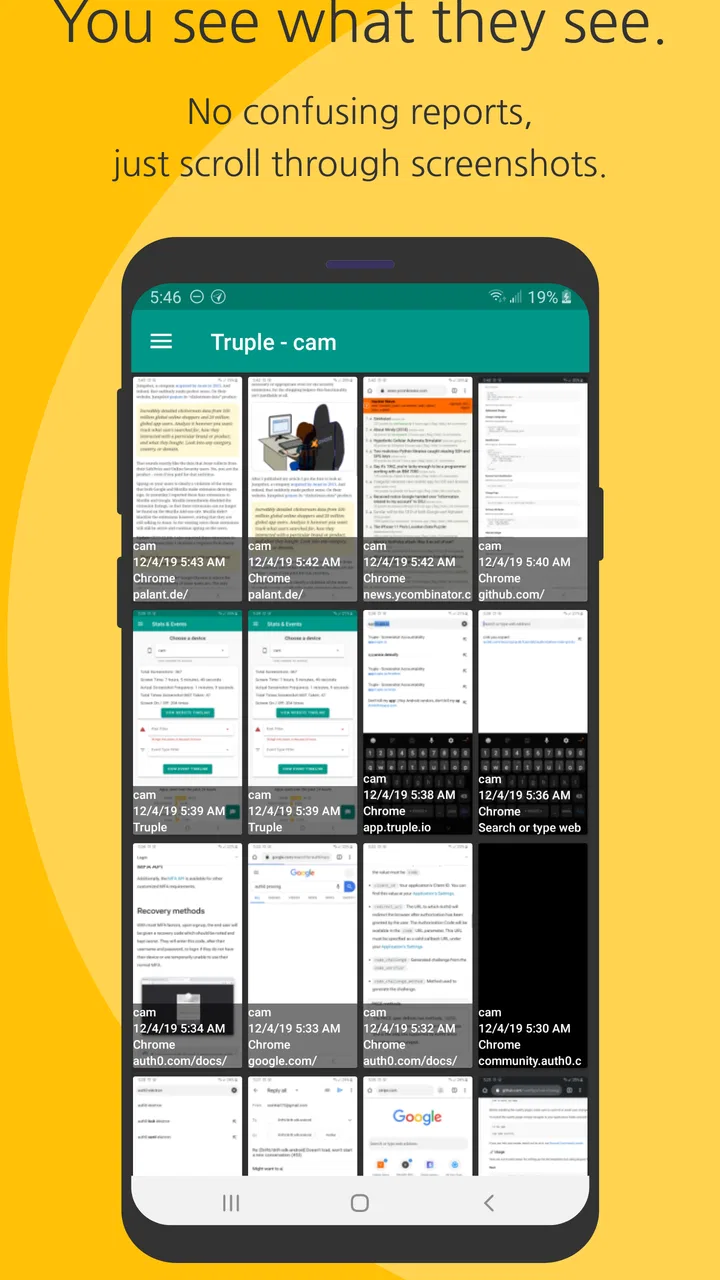
Truple is an app designed to provide accountability by capturing periodic screenshots of your device's activity. These screenshots are then shared with your chosen accountability partners. The app works in the background, ensuring transparency and helping users stay focused on their goals, whether it's reducing screen time or avoiding distractions.
02Is Truple available for both Android and iOS devices?
Yes, Truple is available for both Android and iOS platforms. Users can download it from the Google Play Store or Apple App Store. The app functions similarly on both operating systems, providing a seamless experience across devices and ensuring that you maintain accountability no matter which platform you use.
03How does Truple ensure privacy and security of my data?
Truple prioritizes user privacy and security by encrypting all data before it's transmitted. Screenshots are only accessible to your selected accountability partners. The app does not store data on its servers permanently, and users have control over who can view their activity, ensuring your personal information remains confidential.
04Can I customize the frequency of screenshots in Truple?
Yes, Truple allows users to customize the frequency at which screenshots are taken. You can adjust the settings to capture your screen at intervals that suit your needs, whether it's every few minutes or several times a day. This flexibility helps tailor the app to your specific accountability goals.
05What are the subscription options and costs associated with Truple?
Truple offers various subscription plans to suit different needs, with options for monthly and annual billing. While there is a free trial available to test the app, continued use requires a subscription. Prices are competitive, and updates to the app are included, ensuring you always have access to the latest features.
Pros
- Easy-to-use interface for all users.
- Real-time monitoring for enhanced accountability.
- Customizable settings to fit personal needs.
- Supports multiple devices for comprehensive tracking.
- Strong privacy measures to protect data.
Cons
- Requires internet connection for full functionality.
- Limited features in the free version.
- May drain battery with continuous use.
- Potential privacy concerns with data sharing.
- Subscription required for premium features.

Truple - Online Accountability
Gallery